Getting Started with Clojure
Published on
by vinayak
Introduction
Clojure is a functional programming language and dialect of the Lisp programming language means it use prefix notation for all its expressions, which runs on the Java Virtual Machine (JVM).
From Clojure's website: https://clojure.org
Clojure is a dialect of Lisp, and shares with Lisp the code-as-data philosophy and a powerful macro system. Clojure is predominantly a functional programming language, and features a rich set of immutable, persistent data structures. When mutable state is needed, Clojure offers a software transactional memory system and reactive Agent system that ensure clean, correct, multithreaded designs.
Clojure is a compiled and JVM-hosted language. It's compiler translates Clojure forms into JVM bytecode, which is then executed by the JVM. It also provides REPL (Read-Eval-Print Loop) support, this allows us to interactively evaluate Clojure expressions.
How Clojure code executes
Clojure code is executed in the following steps:
- Clojure source code
- Clojure Reader (Reads source into Clojure forms)
- Clojure Compiler (Compiles Clojure forms into JVM bytecode)
- JVM Execution (Executes the compiled bytecode)
Environment Setup
For compiling Clojure code, there are two popular ways to do this:
- Using Leiningen (Build and project management)
- Using Clojure CLI (Official command-line tool)
Using Clojure CLI
In case of Clojure CLI, the project is configured manually unlike Leiningen.
- creating a new project using Clojure CLI
In case of Clojure CLI, new Projects are created manually by setting up the folder structure and deps.edn file.
Folder structure for a Clojure CLI project typically looks like this:
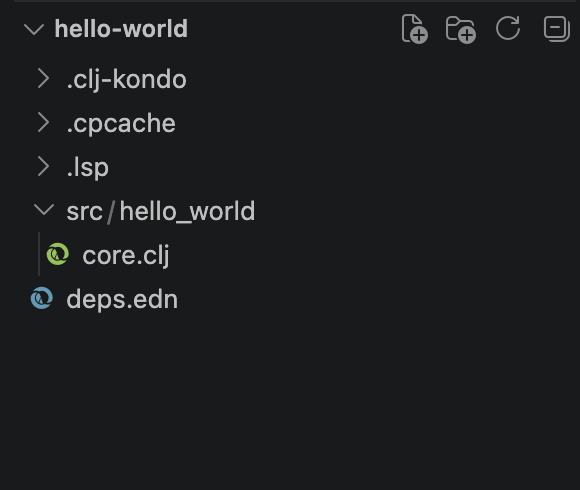
where the project is configured using Clojure CLI (deps.edn)
- running the project using Clojure CLI
clojure -M -m hello-world.core- running the REPL using Clojure CLI
clojure -MUsing Leiningen
- creating a new project using Leiningen
lein new app hello-worldFolder structure for a Leiningen project typically looks like this:
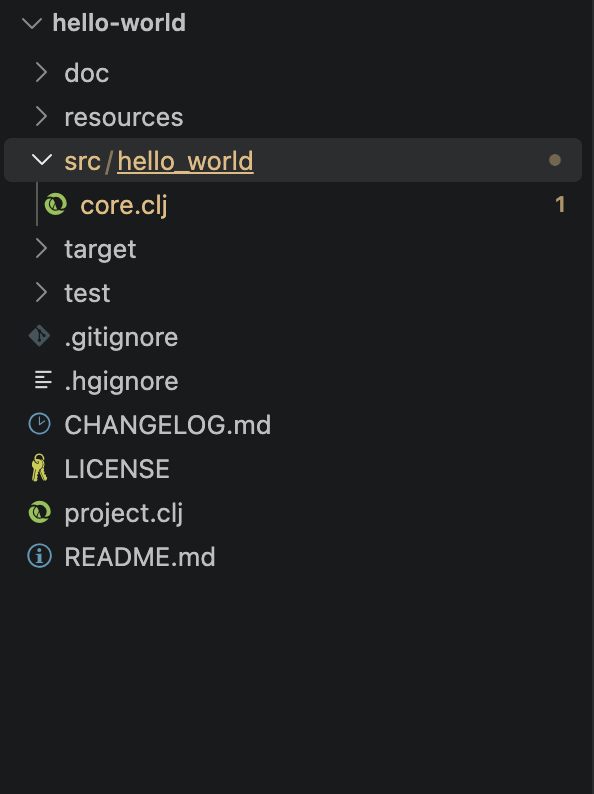
where the project is configured using Leiningen (project.clj)
- running the project using Leiningen
lein run- running the REPL using Leiningen
lein replLanguage Basics
- Data Types Clojure supports several fundamental data types.
| Type | Example | Description |
|---|---|---|
| Integer | 42 | Whole number without a decimal point |
| Float/Double | 3.14 | Numeric value with a decimal point |
| String | "Hello" | Text enclosed in double quotes |
| Boolean | true, false | Logical values representing true or false |
| Nil | nil | Represents the absence of a value |
| Keyword | :name | Named identifier commonly used as a key in maps |
| Symbol | user-name | Name used to refer to a value, function, or other entity |
| Character | \A | Represents a single character |
(type 42)
;; => java.lang.Long
(type 12.09)
;; => java.lang.Double
(type "Hello")
;; => java.lang.String
(type :name)
;; => clojure.lang.Keyword
(def name "Vinayak")
(type name)
;; => java.lang.String
Difference between Keyword vs String vs Symbol:
;; Keyword
;; Define a map
(def user {:name "Vinayak" :age 28})
;; Use
(println (:name user))
;; => "Vinayak"
(println (:age user))
;; => 28
(type user)
;; => clojure.lang.PersistentArrayMap
(type :name)
;; => clojure.lang.Keyword


;; String
(def name "Vinayak")
(println name)
;; => "Vinayak"
(type name)
;; => java.lang.String

;; Symbol -> represent a name literally
(type 'name)
;; => clojure.lang.Symbol- Variables
In clojure, variables are immutable by default. Which means once a value is assigned it can not be changed.
(def name "vinayak")
;; Try to change name directly
(set! name "vinayak sharma")
;; Execution error (IllegalStateException) at user/eval1577 (REPL:1).
;; Can't change/establish root binding of: name with set
But we can Re-definition using def again:
(def name "vinayak")
(def name "vinayak sharma")
(println name)
;; => vinayak sharma
Defining array
(def numbers [1 2 3 4 5])
(println numbers)
;; => [1 2 3 4 5]
(type numbers)
;; => clojure.lang.PersistentVector
Defining map
(def user {:name "Vinayak" :age 28})
(println user)
;; => {:name "Vinayak", :age 28}
(type user)
;; => clojure.lang.PersistentArrayMap- Operators
(+ 10 5)       ;; => 15
(- 10 5)       ;; => 5
(* 10 5)       ;; => 50
(/ 10 5)       ;; => 2

(= 10 10)      ;; => true, this is different from assignment
(not= 10 5)    ;; => true
(< 5 10)       ;; => true
(>= 10 10)     ;; => true

(and true true) ;; => true
(or false true) ;; => true
(not true)      ;; => false
In Clojure, arithmetic operation support multiple arguments. For example:
(+ 1 2 3 4)   ;; => 10
(* 2 3 4)     ;; => 24
(- 10 1 2)    ;; => 7
(/ 100 2 5) ;; => 10-
Compound Data Types
-
Vector: Ordered collection, efficient indexed access.
(def numbers [1 2 3 4 5]) (println numbers) ;; => [1 2 3 4 5] (type numbers) ;; => clojure.lang.PersistentVector ;; get 2 element (nth numbers 1) ;; => 2 (get numbers 1) ;; => 2 -
List: Ordered collection, efficient sequential access.
(def numbers '(1 2 3 4 5)) (println numbers) ;; => (1 2 3 4 5) (type numbers) ;; => clojure.lang.PersistentList (first numbers) ;; => 1 (nth numbers 1) ;; => 2 (nth numbers 2) ;; => 3 (get numbers 7 "default") ;; => "default" -
Map: Stores key-value pairs.
(def user {:name "Vinayak" :age 28}) (println user) ;; => {:name "Vinayak", :age 28} (type user) ;; => clojure.lang.PersistentArrayMap -
Set: Stores unique values.
(def numbers #{1 2 3 4 5})
(println numbers)
;; => #{1 2 3 4 5}
(type numbers)
;; => clojure.lang.PersistentHashSet
-
-
Functions
In clojure, functions are defined using the defn macro. Here is an example:
;; Define a function
(defn add [a b]
    (+ a b))

;; Call the function
(add 10 20)
;; => 30
Quick Reference
| Syntax | Meaning |
|---|---|
fn | Creates a function |
[name] | Defines a function parameter |
(str ...) | Combines values into a string |
#() | Shorthand syntax for an anonymous function |
% | Represents the first argument in #() |
%1 | Represents the first argument in #() |
%2 | Represents the second argument in #() |
%& | Represents the rest of the arguments in #() |
Fundamentals
-
Conditionals
- if
Syntax:
    (if condition
        then-expression
    else-expression)
Example:
(defn check-age [age] (if (>= age 18) "Adult" "Minor")) (check-age 20) ;; => "Adult"-
when when is used if we need to execute multiple expressions if a condition is true, without an else.
(when (> 10 5) (println "Condition is true") "Success") ;; Condition is true ;; "Success" -
cond cond is used for multiple conditional branches.
(defn grade [marks]
(cond
(>= marks 90) "A"
(>= marks 75) "B"
(>= marks 50) "C"
:else "Fail"))
;; calling the grade function with 82 marks
(grade 82)
;; => "B"
:else is used as fallback value.
-
Loops
- doseq
(doseq [n [1 2 3 4 5]] (println n)) ;; => 1 ;; => 2 ;; => 3 ;; => 4 ;; => 5- for
(for [n [1 2 3 4 5]] (* n 2)) ;; => (2 4 6 8 10) (for [n [1 2 3 4 5]] (println n)) ;; => 1 ;; => 2 ;; => 3 ;; => 4 ;; => 5- loop and recur
(loop [n 5]
    (when (> n 0)
        (println n)
        (recur (dec n))))
;; => 5
;; => 4
;; => 3
;; => 2
;; => 1
When to use what?
| Construct | Purpose |
|---|---|
doseq | Perform side effects for each item in a collection |
for | Generate a sequence of results |
map | Transform every item in a collection |
reduce | Combine items into a single result |
loop/recur | Implement custom iterative logic using recursion without growing the call stack |
- Atoms In Clojure values are immutable by default. Atoms allow storing a value that can change over time or creates a mutable reference.
(def age (atom 25))
(println @age)
;; => 25
(println age)
;; #object[clojure.lang.Atom 0x3a14182a {:status :ready, :val 25}]
(reset! age 30)
(println @age)
;; => 30
Increase the value using swap!
(def age (atom 25))
(swap! age inc)
(println @age)
;; Output: 26- Sequences
| Function | Purpose | Example |
|---|---|---|
first | Get the first item | (first '(10 20 30)) → 10 |
rest | Get remaining items | (rest '(10 20 30)) → (20 30) |
seq | Get a sequence view | (seq [1 2 3]) → (1 2 3) |
map | Transform every item | (map inc [1 2 3]) → (2 3 4) |
filter | Select matching items | (filter even? [1 2 3 4]) → (2 4) |
count | Count items | (count '(10 20 30)) → 3 |
-
Map & Records
-
Map : Maps are flexible key-value structures.
(def user
    {:id 101
    :name "Vinayak"
    :role "Engineer"})

(:name user)
;; => "Vinayak"

(assoc user :age 28)
;; => {:id 101, :name "Vinayak",
;; :role "Engineer", :age 28}- Records : Records are fixed-schema key-value structures.
(defrecord Employee [id name department])

(def emp
    (->Employee 101 "Vinayak" "Engineering"))

(:name emp)
;; => "Vinayak"

(assoc emp :location "Bangalore")
;; Returns a new record-like value with the extra key
- Destructuring Destructuring extracts values from collections and binds them to local names.
;; Vector destructuring
(let [[a b c] [1 2 3]]
    (println a b c))
;; => 1 2 3

(let [[a b c] [10 20 30]]
    (+ a b c))
;; => 60

;; Map destructuring
(let [{:keys [id name]} {:id 101 :name "Vinayak"}]
    (println id name))
;; => 101 "Vinayak"

;; Destructuring function arguments
(defn greet [{:keys [name]}]
    (str "Hello, " name))

(greet {:name "Vinayak"})
;; => "Hello, Vinayak"- Exception Handling
Clojure uses try, catch, and finally for exception handling.
(try
    (/ 1 0)
    (catch ArithmeticException e
    (println "Caught exception:" (.getMessage e)))
    (finally
    (println "Finally block executed")))
Using throw
(defn withdraw [balance amount]
    (if (> amount balance)
    (throw (ex-info "Insufficient funds"
                    {:balance balance
                        :amount amount}))
    (- balance amount)))
More on Clojure
- Namespaces
Namespaces organize code into logical modules and prevent naming conflicts.
(ns my-app.core)(ns myapp.payments)
(defn process-payment [amount]
(str "Processing payment: " amount))
(process-payment 100)
;; => "Processing payment: 100"Requiring namespaces in Clojure is done using the require function within the ns macro.
(ns my-app.core
(:require [myapp.payments :as payments]))- Macros
Macros allow to extend the language by transforming code before it executes. Functions operate on values at runtime, whereas macros operate on code at compile-time.
defmacro: Used to define a macro.
(defmacro macro_name [condition & body]
    `(if (not ~condition)
        (do ~@body)))

(macro_name false
    (println "This will be printed"))
;; => "This will be printed"
Understand the Syntax
| Syntax | Meaning |
|---|---|
defmacro | Defines a macro |
Backtick ` | Syntax-quotes a code form |
~ | Unquotes and inserts a form |
~@ | Splices a sequence of forms into another form |
- Watchers A watcher observes changes to a reference type and runs a callback when its state changes. Watchers can be attached to atoms, refs, and agents.
(def balance (atom 100))

(add-watch balance :audit
    (fn [key reference old-value new-value]
    (println "Balance changed:"
        old-value "->" new-value)))

(reset! balance 200)
;; Prints a message about 100 -> 200
Note: fn is used to create an anonymous function
- Agents An agent manages state through asynchronous actions.
(def counter (agent 0))
(send counter inc)
(await counter)

@counter
;; => 1
send schedules an action on an agent's thread pool. await waits for actions dispatched before the call to finish.
Atom vs Agent in Clojure
| Feature | Atom | Agent |
|---|---|---|
| State update | Synchronous | Asynchronous |
| Update operation | swap!, reset! | send, send-off |
| Read state | @atom | @agent |
| Main use | Independent shared state | Asynchronous state updates |
Note: Atoms are suitable for managing independent shared state, while agents are ideal for handling asynchronous state updates.
- Reference Values
Clojure provides several reference types for managing state, especially when concurrency is involved.
- Atoms
(def x (atom 10))
(swap! x inc)
@x
;; => 11- Agent
(def counter (agent 0))
(send counter inc)
(await counter)
@counter
;; => 1- Ref
(def r (ref 0))
(dosync
    (alter r inc))
@r
;; => 1- Var
(def ^:dynamic *my-var* 42)
*my-var*
;; => 42